


Subaru Infotainment System Guide and Walkthrough
Ever wonder how to maximize the potential of your Subaru infotainment system?
In this comprehensive overview, we’ll cover everything you need to know about your Subaru’s infotainment system, from its basic functionalities to advanced tips and tricks.
Whether you’re a new Subaru owner or a seasoned enthusiast, this guide will help you understand the power of your vehicle’s technology like never before.
Overview of the Subaru Infotainment System:
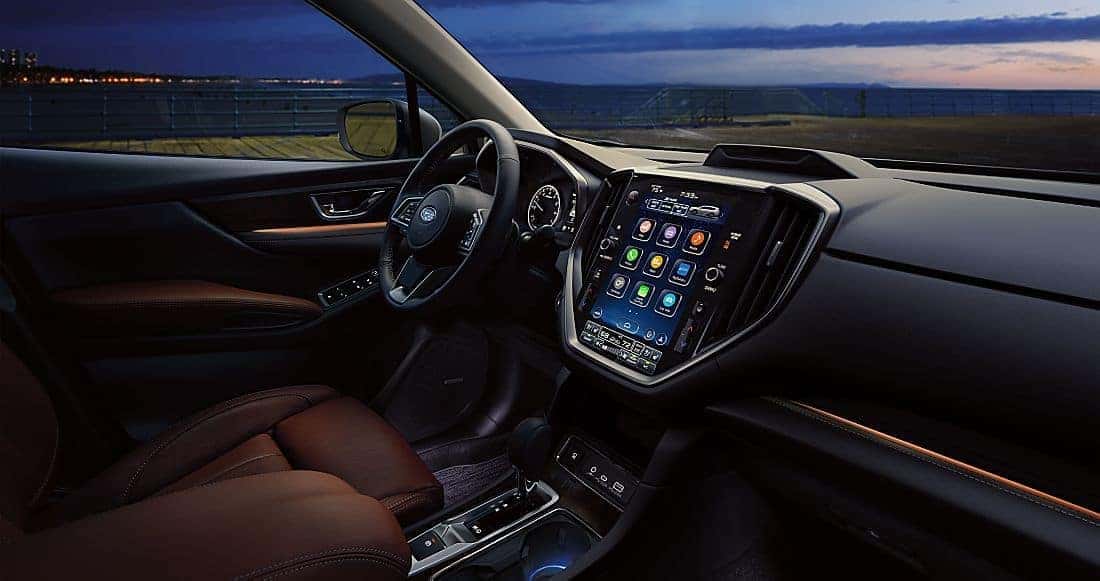
The Subaru infotainment system is the central hub for connectivity, entertainment, navigation, and vehicle customization. Designed for ease of use and safety, it integrates key driving functions into one intuitive interface.
What the Subaru Infotainment System Controls
-
Audio and media
-
Navigation (where equipped)
-
Phone connectivity
-
Climate and comfort settings (on select models)
-
Driver-assist and vehicle preferences
-
Connected services through Subaru STARLINK®
Core Subaru Infotainment Features:
Touchscreen Display
-
High-resolution touchscreen interface
-
Portrait or landscape orientation depending on model
-
Customizable home screen shortcuts
-
Designed for quick access with minimal distraction
Navigation (If Equipped)
-
Turn-by-turn directions
-
Traffic-aware routing
-
Points of interest and destination search
Many drivers also choose navigation through Apple CarPlay® or Android Auto™.
Media & Audio
-
AM/FM radio and available SiriusXM®
-
Bluetooth® audio streaming
-
USB connectivity
-
Available premium audio systems on select trims
Hands-Free Communication
-
Bluetooth phone pairing
-
Steering-wheel-mounted controls
-
Voice commands for calls, messages, and navigation
Vehicle Settings
-
Climate control integration (model dependent)
-
Display, sound, and system preferences
-
Driver-assist feature customization
-
Lighting and convenience settings
Subaru STARLINK®
Subaru STARLINK® expands infotainment capabilities through connected vehicle services available in the MySubaru app (subscription required).
STARLINK Features May Include
-
Remote engine start
-
Remote door lock and unlock
-
Vehicle health and maintenance alerts
-
Emergency assistance features
-
Vehicle locator tools
Availability varies by model, trim, and subscription plan.
How to Use the Subaru Infotainment System
Accessing the Home Screen
-
Tap icons or swipe between screens
-
Rearrange shortcuts on supported systems
Using Navigation
-
Select built-in navigation (if equipped)
-
Or launch Apple Maps®, Google Maps™, or Waze® through smartphone integration
Media Control
-
Choose your audio source (radio, Bluetooth, USB, or smartphone apps)
-
Playback resumes automatically when restarting the vehicle
Phone & Voice Commands
-
Pair your phone once via Bluetooth
-
Use Siri® or Google Assistant™ with steering-wheel voice controls
Adjusting Vehicle Settings
-
Open the Settings menu
-
Navigate by category (Audio, Display, Vehicle, Driver Assist)
Benefits of the Subaru Infotainment System
Convenience
Centralized access to navigation, media, and vehicle settings.
Safety
Hands-free calling and voice controls help reduce driver distraction.
Connectivity
Seamless smartphone integration keeps you connected on the road.
Customization
Driver-specific preferences and system settings.
Ease of Use
Clean menus and an intuitive layout designed for everyday driving.
How to Restart the Subaru Infotainment System
If the system becomes slow or unresponsive:
-
Press and hold the volume/power knob
-
Continue holding for 10–15 seconds
-
Release when the screen turns off
-
The system will reboot automatically
This will not erase saved settings or paired devices.
Apple CarPlay® & Android Auto™
Subaru infotainment systems support smartphone integration, allowing familiar apps to appear directly on the touchscreen.
Apple CarPlay
-
Siri voice control
-
Apple Maps, Messages, Music, and Podcasts
-
Compatible third-party apps
Android Auto
-
Google Assistant voice commands
-
Google Maps, Spotify, and messaging apps
-
Simplified, driver-friendly interface
Connection may be wired or wireless depending on model and trim.
Help with Your Subaru Infotainment System
If you need assistance setting up your system, pairing your phone, or learning available features, Walser Subaru St. Paul is here to help.
Our Love Encore Specialist can assist with:
-
Infotainment walkthroughs
-
STARLINK setup and questions
-
Bluetooth and smartphone pairing
-
Hands-on demonstrations during test drives
Visit us or contact our Subaru Love Encore Specialist for personalized support.